Clinically informed guidance
M.T. Groom MSc MCSP · UK-registered Physical Therapist · 25+ years of clinical experience
Start with compatibility and maintenance rather than advanced features. Apple Watch SE 3 is the strongest safety option here for iPhone users, while Samsung Galaxy Watch9 provides Fall Detection for Android users. Garmin vívofit 4 offers basic step tracking without routine charging, but is discontinued; Fitbit Inspire 3 offers everyday health tracking with less frequent charging than a smartwatch.
The right choice also depends on screen legibility, hand dexterity, smartphone access and whether safety features matter more than battery life. These devices can support healthier routines, but they do not diagnose medical conditions or guarantee that every fall will be detected.
This comparison was updated in September 2026 using manufacturer specifications and checked retailer destinations. Battery ratings are manufacturer estimates, not results from our own testing. Older and discontinued models are identified; stock, prices and phone requirements can change.
Quick Recommendations for Older Adults
- Best simple activity tracker: Garmin vívofit 4 (discontinued) — an always-on display and a replaceable battery, so there is no regular charging routine.
- Best low-cost fitness band: Fitbit Inspire 3 — light, straightforward and rated for up to 10 days of battery life.
- Best iPhone safety option: Apple Watch SE 3 — Fall Detection, Emergency SOS and adjustable text.
- Best Android safety option: Samsung Galaxy Watch9 — Fall Detection and SOS with a large smartwatch display.
- Best ECG-capable fitness band: Fitbit Charge 6 — built-in GPS and an ECG app, with no automatic fall detection.
- Best traditional-watch design: Withings ScanWatch Light — long battery life with heart-rate, sleep and step tracking, but no built-in ECG.
Compare the senior-friendly essentials
Swipe left and right to see all five columns.
| Device | Best for | Manufacturer battery rating | Phone | Automatic fall detection |
|---|---|---|---|---|
| Garmin vívofit 4 | Simple steps | Replaceable battery; no routine charging | Optional for basic display | No |
| Fitbit Inspire 3 | Budget health tracking | Up to 10 days | iPhone or Android for setup | No |
| Fitbit Charge 6 | GPS and ECG app | Up to 7 days | iPhone or Android for setup | No |
| Apple Watch SE 3 | iPhone safety | Up to 18 hours | iPhone | Yes |
| Samsung Galaxy Watch9 | Android safety | Regular smartwatch charging | Android; best with Samsung | Yes |
| Amazfit Band 7 | Low-cost long battery | Up to 18 days | iPhone or Android for setup | No |
| Withings ScanWatch Light | Traditional watch styling | Up to 35 days | iPhone or Android for setup | No |
Important: battery life varies with settings and use. Fall Detection can miss falls and should not replace a dedicated medical alert system when reliable emergency support is required.
Which Fitbit is simplest for seniors: Inspire 3 or Charge 6?
Start with Inspire 3 if you mainly want steps, heart-rate trends and sleep tracking. Its up-to-10-day battery rating means less frequent charging than Charge 6’s up-to-seven-day rating. Both still have small touchscreens: fewer features do not automatically mean easier reading or easier swiping.
Choose Charge 6 if you specifically want built-in GPS or its compatible ECG app. Inspire 3 uses a nearby phone for GPS pace and distance; Charge 6 can record those outdoors without carrying the phone. The side navigation button may suit someone who dislikes relying entirely on swipes. Neither Fitbit has automatic fall detection, and paying more does not guarantee more accurate steps with a walking aid.
Both require a Google Account, internet access and a compatible phone for setup in the Google Health app. Basic steps, heart-rate and sleep tracking do not require a Premium subscription; optional coaching and some detailed insights do. For a simpler daily routine, choose a readable clock face, leave unnecessary notifications off and practise finding steps and checking the battery before the return window closes. Compare the official Inspire 3 features and Charge 6 features.
How We Compared These Trackers
We compared official specifications and practical factors that matter specifically to adults over 60: display readability, controls, charging burden, fall-detection availability, phone compatibility and the usefulness of everyday activity data. We have not clinically validated these devices or tested every model hands-on; manufacturer health features should be treated as screening or wellbeing tools, not diagnoses.
1. Fitbit Inspire 3 — Best Budget Fitness Tracker for Seniors

Fitbit Inspire 3 is a slim health and activity band with daily steps, 24/7 heart-rate tracking, sleep stages and Active Zone Minutes. Google rates the battery for up to 10 days, reducing the charging burden compared with a smartwatch.
It uses a small colour touchscreen and connected GPS through a compatible phone rather than built-in GPS. Setup, detailed trends and updates use the Google Health app; some coaching and advanced insights require Google Health Premium.
Pros
- Up to 10-day battery life reduces routine charging
- Slim, lightweight design comfortable for all-day and overnight wear
- Bright color display readable in most lighting conditions
- Swipe-based controls; check that the gestures suit the wearer
- Comprehensive free health metrics without mandatory subscription
Cons
- No built-in GPS (uses phone GPS only)
- No fall detection or Emergency SOS
- Screen is small compared to smartwatch options
Check official specifications · Amazon US · Amazon UK
2. Fitbit Charge 6 — Best Mid-Range Tracker for Active Seniors

Fitbit Charge 6 adds built-in GPS, a side navigation button and a compatible ECG app. The ECG feature can record a rhythm snapshot and flag possible atrial fibrillation, but it does not replace a clinical ECG or diagnosis.
Google Maps and Wallet are available when the tracker is paired and configured. Google rates battery life at up to seven days, with actual duration depending on GPS, display and health-monitoring settings.
Pros
- Built-in GPS for outdoor pace and distance without carrying a phone
- Compatible ECG app for assessing possible atrial fibrillation; not a diagnosis
- Colour touchscreen with an always-on display option
- Skin-temperature variation for overnight wellness trends
- Google Maps and Wallet support for added convenience
Cons
- No fall detection
- Seven-day battery (less than Inspire 3)
- Some Google features require account integration that can feel complex
Check official specifications · Amazon US · Amazon UK
3. Apple Watch SE 3 — Best Safety-Focused Tracker for iPhone Users
Apple Watch SE 3 is the strongest iPhone choice here when safety features matter. Apple lists Fall Detection, Emergency SOS, Crash Detection, an Always-On display and adjustable text. If a hard fall is detected, the watch can prompt the wearer and may contact emergency services when there is no response. It is not guaranteed to detect every fall.
Apple rates normal battery life at up to 18 hours and up to 32 hours in Low Power Mode, so regular charging is the main trade-off. The cellular version can provide more independence from the paired iPhone, but requires compatible service and an ongoing plan.
Pros
- Fall Detection, Emergency SOS and Crash Detection
- Always-On display with adjustable text
- Strong integration with iPhone Health
- Fast charging
Cons
- Requires an iPhone
- Up to 18-hour normal battery life means frequent charging
- Cellular independence adds ongoing cost
Check official specifications · Amazon US · Amazon UK
4. Garmin Vivofit 4 — Best Fitness Tracker for Simplicity
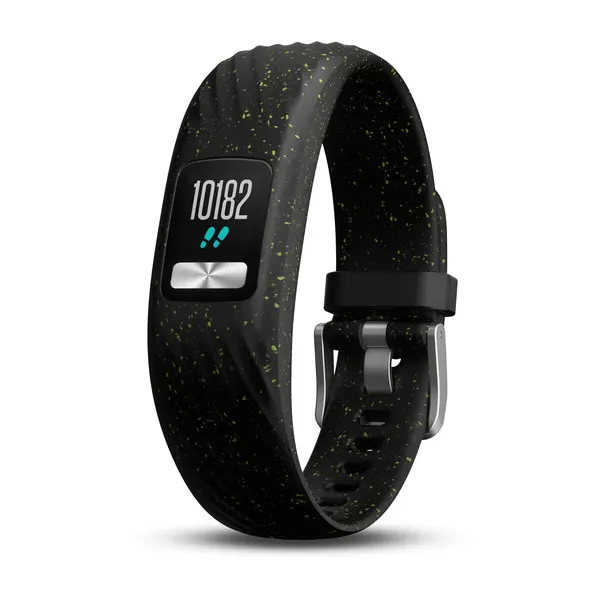
Garmin vívofit 4 uses two replaceable SR43 coin batteries, with battery life listed as one year in its owner’s manual, so there is no regular charging routine. Its always-on display shows steps, distance, calories and the Move Bar inactivity reminder.
Garmin now marks this older, basic model as discontinued. It has no heart-rate sensor, built-in GPS, ECG or Fall Detection, and retailer stock can vary. It remains relevant only for buyers who prioritise simplicity and no routine charging over current health features.
Pros
- About one year of battery life using two replaceable SR43 coin batteries
- Always-on color display that’s readable in direct sunlight
- Basic button-operated interface with fewer health features to navigate
- Move Bar actively reminds you to break up sitting time
- Swim-rated water resistance of 5 ATM; follow Garmin’s care instructions
Cons
- No heart rate monitor
- No GPS
- No fall detection or health alerts
Check official specifications · Amazon US · Amazon UK
5. Samsung Galaxy Watch9 — Best Safety-Focused Tracker for Android Users
Samsung Galaxy Watch9 is the current Android smartwatch option in this comparison. Samsung lists automatic Fall Detection and Emergency SOS alongside a bright display, physical side buttons, activity tracking and health features. It works best in the Samsung ecosystem; some functions require a compatible Samsung phone and account.
For seniors, the benefit is the combination of a readable smartwatch display and emergency features. The trade-offs are a busier interface than a simple band and a regular charging routine. It does not support iPhone.
Pros
- Automatic Fall Detection and Emergency SOS
- Large, bright display with physical side buttons
- Heart, sleep and activity tracking
- 40mm and 44mm case options
Cons
- Android only; best feature support with Samsung phones
- More complex than a basic fitness band
- Requires regular charging
Check official specifications and current price
6. Amazfit Band 7 — Best Value Fitness Tracker for Seniors
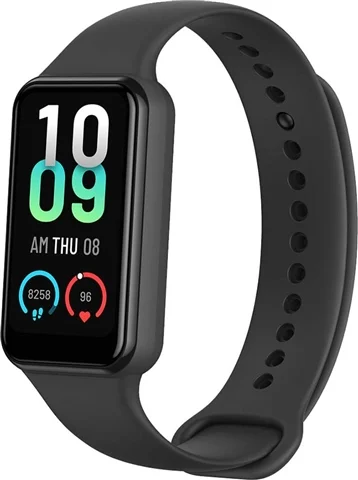
Amazfit Band 7 combines a 1.47-inch AMOLED display with steps, heart rate, sleep and blood-oxygen trends. Amazfit rates typical battery life at up to 18 days and supports both iPhone and Android through the Zepp app.
It has no built-in GPS, ECG or Fall Detection. Amazfit maintains a US product listing; check local stock, returns and app compatibility before buying this older model.
Pros
- Up to 18-day typical-use battery life; settings affect duration
- Optional all-day blood-oxygen monitoring; not a medical measurement
- Bright AMOLED color display at a budget price
- Compatible with both iPhone and Android
- Built-in Alexa for voice reminders and questions
Cons
- Zepp app setup adds another interface to learn
- No fall detection
- No ECG capability
Check official specifications and current price · Amazon US
7. Withings ScanWatch Light — Best Traditional-Watch Design

ScanWatch Light combines real watch hands with a small digital display. Official specifications list 24/7 heart-rate tracking, high and low resting-heart-rate notifications, sleep tracking, step tracking and automatic activity detection. Withings rates battery life at up to 35 days.
The important distinction is that ScanWatch Light does not provide an on-watch ECG or automatic Fall Detection. Withings offers separate services that can review ECG data from compatible devices, but that should not be confused with the Light model recording its own ECG. The small digital display may also be difficult for reduced vision.
Pros
- Traditional analog-watch appearance
- Up to 35-day battery life
- Heart-rate, sleep and activity trends
- Compatible with iPhone and Android
Cons
- No built-in ECG
- No automatic Fall Detection
- Small digital display
- No built-in GPS
Check official specifications and current price · Amazon US · Amazon UK

Pair your tracker with a balance programme
A tracker shows how much you move. It cannot make you steadier on your feet. Simple strength and balance exercises can.
Steady & Strong: Balance Exercises for Seniors Over 60 is a 12-week, large-print, illustrated programme you can follow at home with a sturdy chair. Written by a UK-registered physical therapist with 25 years of experience.
Best Tracker If Your Main Goal Is Walking More
If your main goal is to walk more consistently, you do not need the most advanced smartwatch. Prioritise a clear step count, comfortable daily wearing, long battery life and simple progress reminders. For most older adults, those features matter more than advanced app menus or complex health dashboards.
Use the tracker as a gentle feedback tool: first find your normal baseline, then build gradually. Our guide to how many steps per day seniors need explains realistic targets by age, while how to increase your step count safely after 60 shows how to progress without overdoing it.
If you are choosing mainly for walking, start with the simplest device you will actually wear every day. A basic Fitbit, Garmin or pedometer-style tracker is often more useful than a premium watch that feels too complicated.
A tracker records movement; strength and balance training supports the walking behind those numbers. The Steady & Strong Balance Exercises Book provides a large-print, home-based programme designed by a physical therapist.
See Chair Exercises for foundational strength, Knee Exercises when joint pain limits walking, Back Exercises when back pain limits activity, or compare all five senior exercise books.
Will a tracker count steps if I walk slowly or use a walker?
Slow or shuffling steps and reduced arm movement can make wrist step counts less reliable. Holding a walker or rollator can be especially challenging for a wrist tracker. A low displayed total may reflect missed steps, not a lack of effort; GPS does not fix the wrist sensor’s step-count limitations.
A small study of walking aids and step counters found poor agreement with observed steps, especially for a wrist-worn tracker during four-wheeled-walker use. It tested nine healthy volunteers using a Fitbit Alta on the wrist and Fitbit Zip at the hip, not the seven models compared in this article. It supports caution, not a claim that every tracker has the same error or that one of our picks is proven best for walker users.
Never let go of, switch hands on, or change the safe use of your prescribed walking aid just to register steps. If useful and safe, ask someone to count your steps during a short walk at your usual pace while you use your aid normally, then compare the device. This is a practical check, not a clinical validation. If counts remain inconsistent, record walking time, comfortable distance and how you feel instead; ask your physical therapist how best to monitor progress. Do not add extra walking merely to make up apparently missing steps.
Buying Guide: Choosing the Best Fitness Tracker for a Senior
Phone setup is different from everyday use
- You own a compatible phone: check the exact model and operating system before buying. Apple lists iPhone 11 or later (including iPhone SE 2nd generation or later), with iOS 26 or later, for Watch SE 3. Galaxy Watch9 needs a compatible Android phone, not an iPhone. Fitbit, Amazfit and Withings offer iPhone and Android apps, but not every older phone is supported.
- You want to leave the phone at home on a walk: after setup, basic on-device activity tracking is different from connected features. Both Fitbits display steps on the wrist; Inspire 3 needs the phone for GPS, whereas Charge 6 has built-in GPS. Notifications, syncing and software updates still depend on the phone/app. Do not assume emergency calls will work without the required connection or cellular service.
- You have help with setup, but dislike apps: agree who will help with account access, updates, syncing and charging after the first day. A one-off setup does not remove ongoing maintenance. Use the wearer’s own account rather than mixing their health data into a helper’s account.
- You have no smartphone access: do not buy an app-dependent band assuming it works fully out of the box. Garmin’s vívofit 4 manual allows limited use before setup: step count, auto goal and move bar, with no saved history. The manual describes smartphone or computer setup for additional features; check that the setup route is still practical before buying this discontinued model.
Check the display and controls
Reduced vision or hand dexterity can make a small touch-only band difficult to use. Apple and Samsung provide larger displays, physical controls and adjustable text. A smaller band may be lighter, but test readability and gestures before the retailer’s return window closes.
Match charging to the person
Apple and Samsung watches need frequent charging. Fitbit and Amazfit bands last longer between charges, Withings rates ScanWatch Light for up to 35 days, and Garmin vívofit 4 uses replaceable batteries. Choose the routine the wearer can maintain reliably.
Understand Fall Detection
Apple Watch SE 3 and Samsung Galaxy Watch9 provide automatic Fall Detection when enabled and connected. Neither detects every fall, and both depend on correct setup and available connectivity. A dedicated medical alert system may be more appropriate when reliable emergency response is essential. See our fall-prevention guide and balance exercises for adults over 70.
Choose by priority
- Simple steps with no routine charging: Garmin vívofit 4, if an older model with limited health features is acceptable.
- Low-cost health band: Fitbit Inspire 3.
- GPS and an ECG app in a band: Fitbit Charge 6.
- iPhone safety features: Apple Watch SE 3.
- Android safety features: Samsung Galaxy Watch9.
- Traditional appearance and long battery life: Withings ScanWatch Light.
Frequently Asked Questions
Do I need a smartphone to use a fitness tracker?
Most trackers here need a compatible phone and app for setup, syncing and updates, but you do not necessarily need to carry the phone for basic steps after setup. Phone-free GPS and emergency communication are separate questions. Garmin vívofit 4 has limited step-count functions before setup, but is discontinued. See the phone setup versus everyday use guide before buying.
Does Medicare cover fitness trackers?
Standard Medicare (Parts A and B) does not cover consumer fitness trackers. Some Medicare Advantage plans (Part C) include fitness benefits through programs like SilverSneakers or Renew Active, which may provide gym memberships or wellness equipment allowances — but consumer wearables like Fitbit or Apple Watch are generally not covered. Check your specific Medicare Advantage plan’s Supplemental Benefits or over-the-counter (OTC) allowance, as some plans do include electronics credits. It’s worth a call to your plan administrator to ask explicitly.
What is the easiest fitness tracker for seniors to use?
Garmin vívofit 4 avoids routine charging because it has an always-on display and replaceable batteries, but it is discontinued and has limited health features. Fitbit Inspire 3 is an alternative when heart-rate and sleep tracking matter and regular charging is manageable. Apple and Samsung watches offer more safety features but also more menus and setup.
Which trackers actually detect falls?
Apple Watch SE 3 and Samsung Galaxy Watch9 include automatic Fall Detection. Both can prompt the wearer and contact help when configured, but neither is guaranteed to detect every fall. A dedicated medical alert system may be more appropriate when reliable emergency response is the priority.
How accurate are fitness tracker heart rate monitors for seniors?
Wrist-based optical sensors are useful for trends but can be affected by movement, fit, skin contact and other factors. Treat unusual readings as a prompt to check again, not as a diagnosis. Consumer wearables do not replace clinical assessment or prescribed monitoring. Fitbit Charge 6 and Samsung Galaxy Watch9 offer compatible ECG features on supported phones and in supported regions. Apple Watch SE 3 and ScanWatch Light do not record an on-watch ECG.
Best Fitness Bands and Trackers for Elderly Users
For an older person, prioritise a readable display, manageable charging and phone compatibility. Choose Garmin vívofit 4 for basic steps without routine charging, Fitbit Inspire 3 for an affordable health band, Apple Watch SE 3 for iPhone safety features, or Samsung Galaxy Watch9 for Android safety features.
Conclusion
The best tracker is the one the wearer can read, charge and use consistently. Apple Watch SE 3 and Samsung Galaxy Watch9 are the strongest safety-focused choices for their respective phone systems. Fitbit Inspire 3 suits affordable everyday tracking, Charge 6 adds GPS and an ECG app, and ScanWatch Light combines traditional styling with long battery life.
Garmin vívofit 4 remains useful for simple step counting without routine charging, but it is an older product with limited health features. Check current specifications, phone compatibility and retailer availability before buying.
About the Author
M.T. Groom MSc MCSP is a UK-registered Physical Therapist with over 25 years of clinical experience working with older adults. They specialize in fall prevention, mobility rehabilitation, and home-based exercise programmes.
This article was reviewed by M.T. Groom and is updated quarterly.
Ready for the next step?
If you want a structured plan rather than piecing exercises together, this is the book I would start with.
Steady & Strong: Balance Exercises for Seniors Over 60 is a 12-week, large-print, illustrated programme you can follow at home with a sturdy chair. Written by a UK-registered physical therapist with 25 years of experience.
Continue with a structured programme
Explore the Steady & Strong exercise books or try the programmes first with free mini guides and printable resources.
Get 5 free exercise mini guides
Chair, balance, knee, hip and back. Printable PDFs sent to your inbox.